
FIRST 1,000 ANNUAL MEMBERS GET A SIGNED COPY
The app that shows
where your money
actually goes
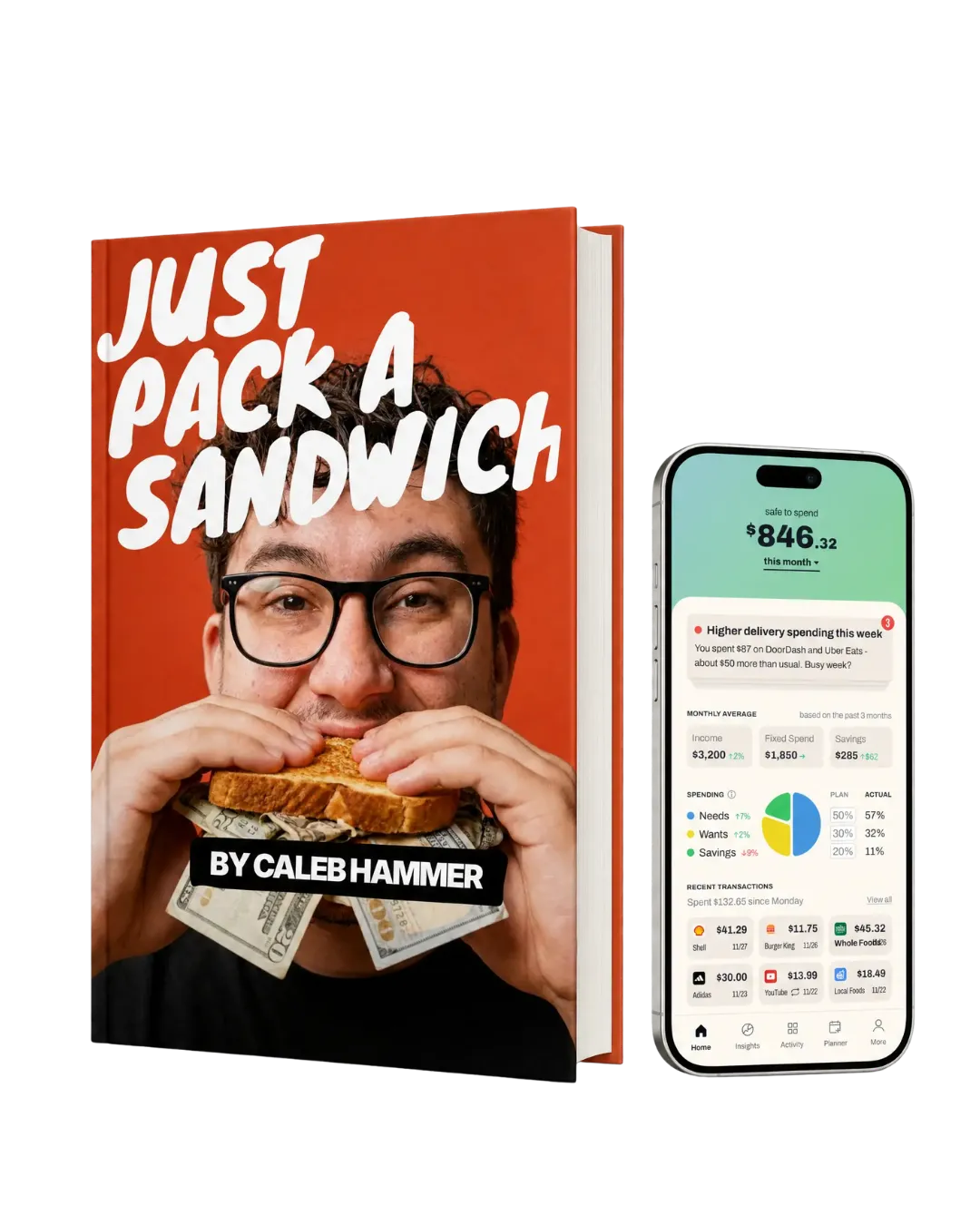
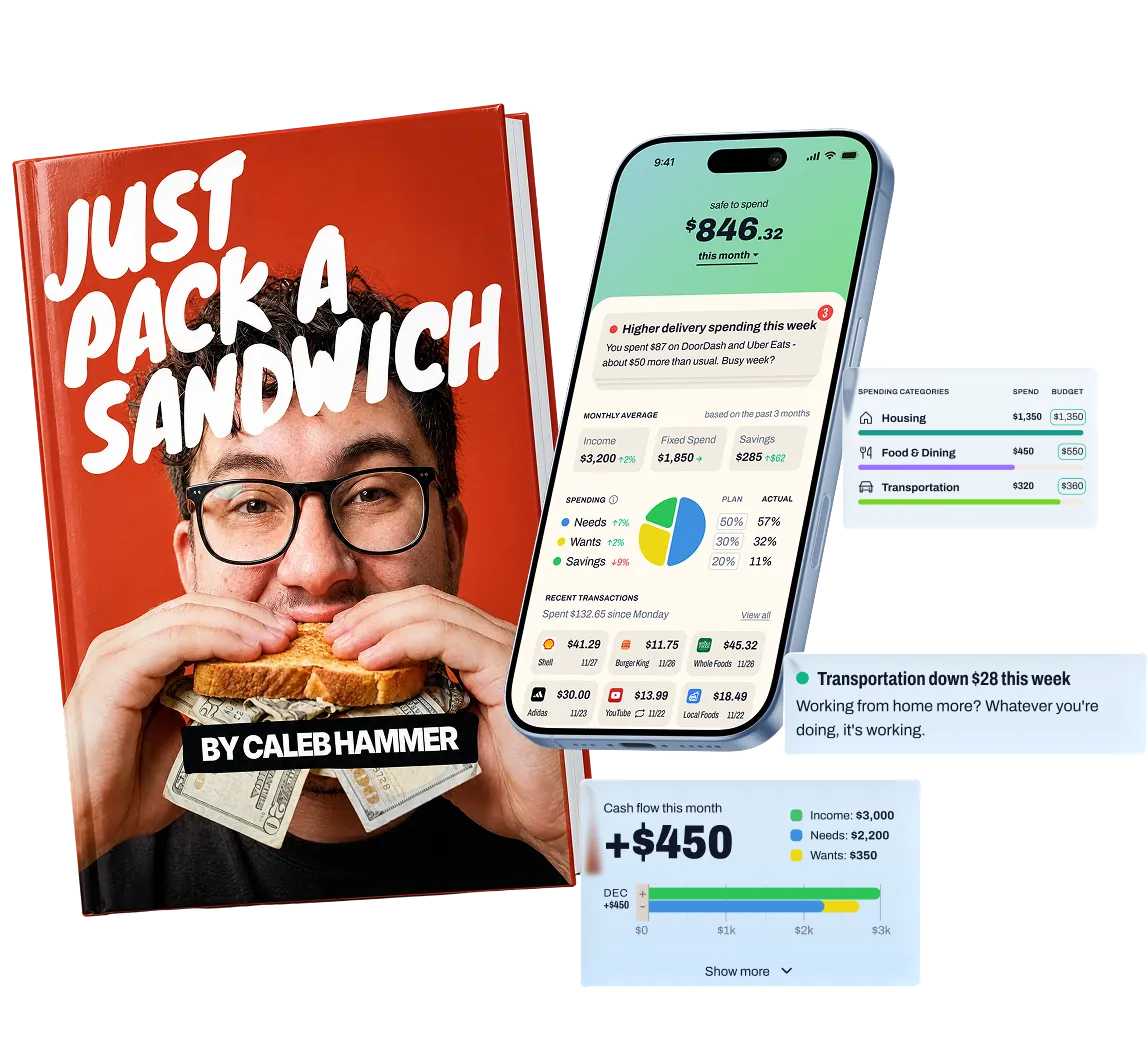
Get Caleb’s NEW physical cookbook with a full year of Dollarwise—and start putting your money where your mouth is.
Questions about the cookbook or your plan? See the FAQ ↓



Be the hero of your money story
Never lose track of your budget again.
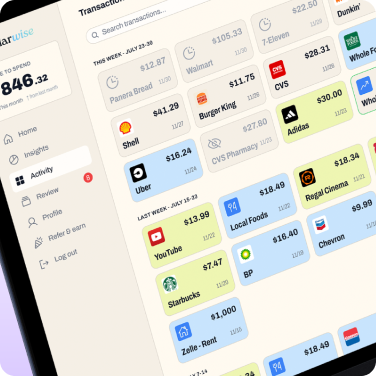
Every transaction, sorted automatically.
Every transaction in one place, sorted into spending categories that match how you actually spend — app or web. No spreadsheet. No guessing. No surprises at the end of the month.
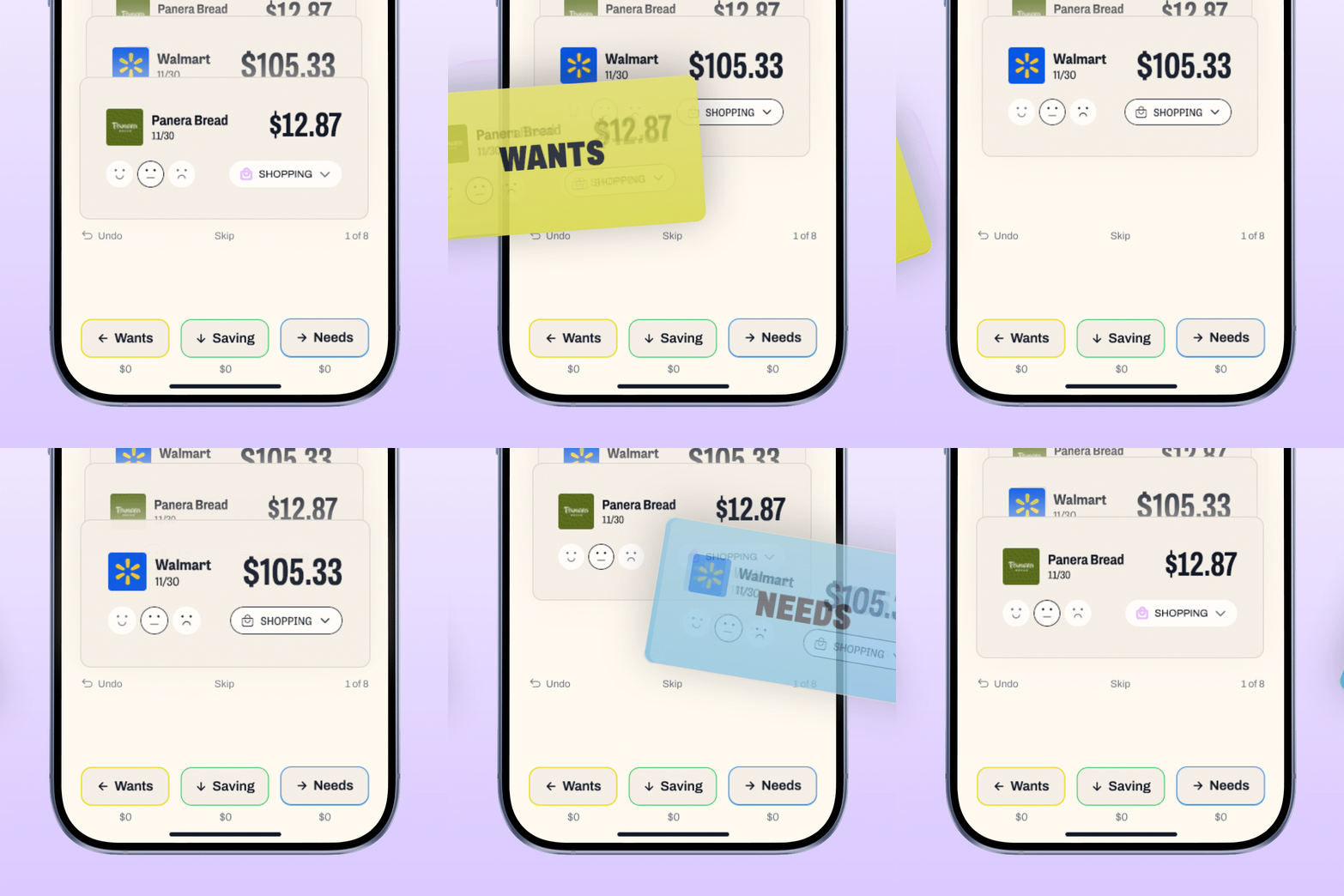
The weekly swipe review.
A monthly plan built from your actual monthly income. When spending shifts or the car breaks, the plan adjusts with you. No starting over.
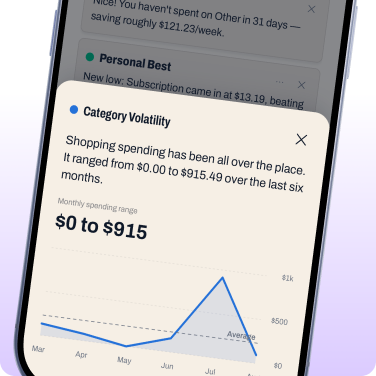
Rules based insights, built from your numbers.
Every insight comes from a rule we can show you, not a model guessing at your life. It's real data from real numbers, designed to get you on a real budget.
Finally a budget that survives real life
Build your budget, then keep it honest in just five minutes a week.
Sign up
Low price, big investment
On web, android, and iOS. Same app. Same experience.
Choose the subscription that works for your budget.







Features made for you
And a budget that actually makes sense
Building your budget
Dollarwise builds your plan on the 50/30/20 method.
• 50% Needs: housing, utilities, groceries
• 30% Wants: dining out, shopping, entertainment
• 20% Savings: Investments & Emergency Funds
Set your monthly income and see three things: your plan, what you spent, what's left. If the split doesn't fit, adjust it.
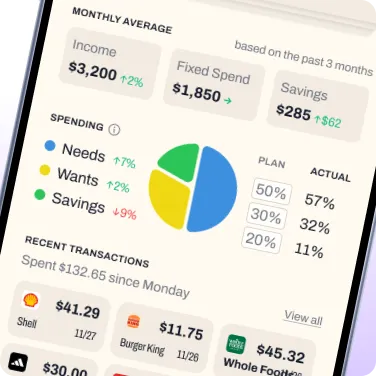
Building your budget
Dollarwise builds your plan on the 50/30/20 method.
• 50% Needs: housing, utilities, groceries
• 30% Wants: dining out, shopping, entertainment
• 20% Savings
Set your monthly income and see three things: your plan, what you spent, what's left. If the split doesn't fit, adjust it.
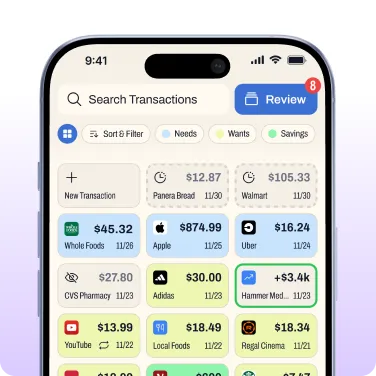
Transaction Categorization
Every synced transaction sorts itself according to the merchant and description. If a purchase lands in the wrong category, change it.
Then the Review flow keeps things honest:
👉 Swipe right for Needs
👈 Left for Wants
👇 Down for Savings
Transaction Categorization
Every synced transaction sorts itself according to the merchant and description. If a purchase lands in the wrong category, change it.
Then the Review flow keeps things honest:
👉 Swipe right for Needs
👈 Left for Wants
👇 Down for Savings
Transfers between your own accounts never count as spending.
Deep financial insights
Built entirely from your actual transactions. See total spending against your budget for this month or any month before it. Every category shows what you budgeted, what you spent, what's left.
If something seems off, like a duplicate or odd purchase, Dollarwise flags it and explains why.
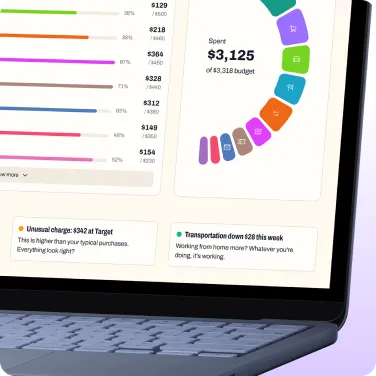
Insights
Built entirely from your actual transactions. See total spending against your budget for this month or any month before it. Every category shows what you budgeted, what you spent, what's left.
If something seems off, like a duplicate or odd purchase, Dollarwise flags it and explains why.
All your money in three buckets
That’s it!
And the wants bucket lets you spend on yourself as part of the plan.
Dollarwise questions, answered
How Dollarwise works, how your information stays safe, and how to get the most out of five minutes a week.
All about the cookbookFirst 1,000 signedHow to claim it, shipping, signed copies, and more
Tap any question below.
How do I get the cookbook?
Sign up for a Dollarwise Annual subscription during our promotional window. If you’re an active monthly member, you can upgrade your account to an Annual subscription to claim your copy.
I’m already a monthly member. How do I get mine?
The only way to redeem the cookbook is to switch to an Annual subscription. You can do it right in the Dollarwise app in under a minute:
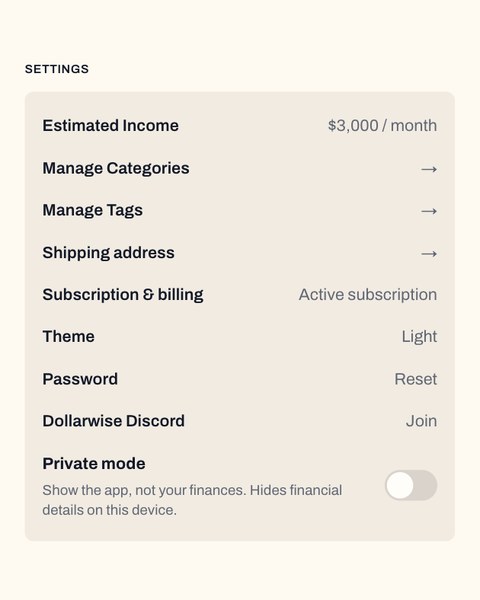
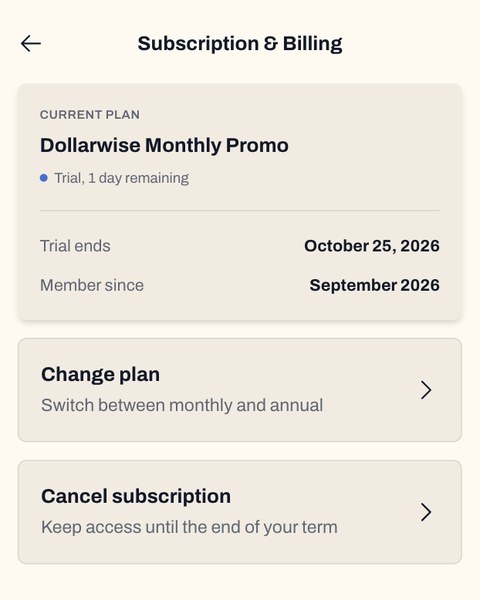
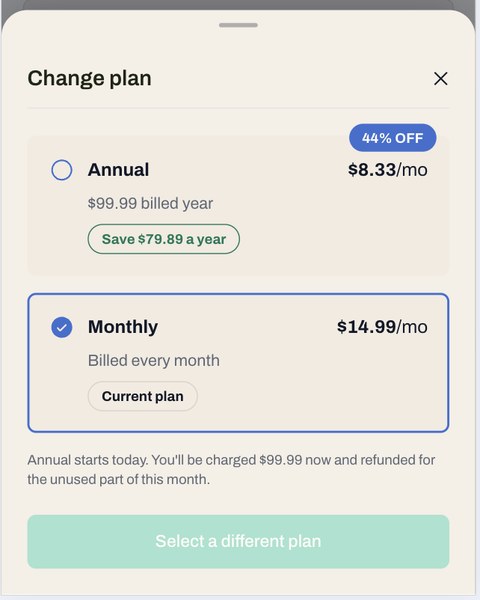
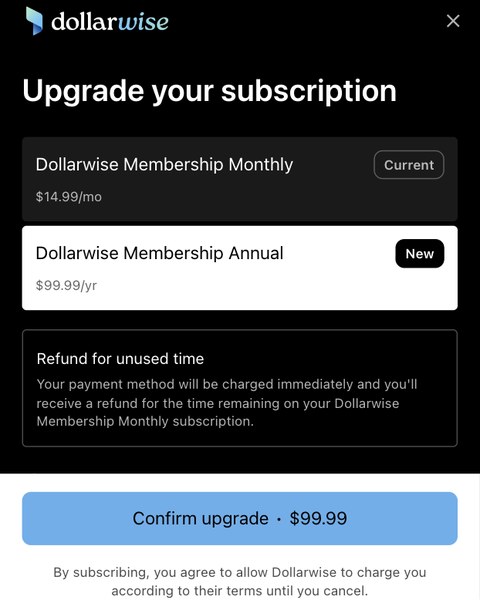
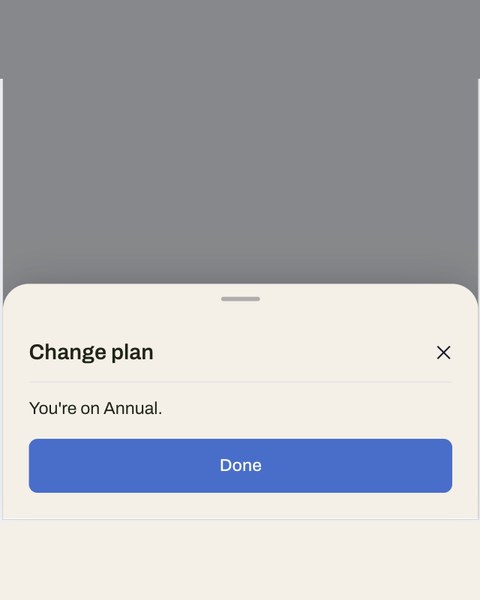
Swipe to see every step.
Next, add your shipping address. The app should ask for it right after you upgrade. Didn’t see the prompt? Go to Settings → Shipping address and add it there.
How do I get a signed cookbook?First 1,000
Caleb only has so much time, so only the first 1,000 cookbooks sold across the launch will be hand signed, while supplies last. Signed copies go out in the exact order orders are received. Once they’re gone, orders receive the standard unsigned edition, also while supplies last.
Where do I add my shipping address?
In the Dollarwise app, go to Settings → Shipping address, fill in your US address, and tap Save shipping address. We ship to all 50 states and Washington, DC.
When will my cookbook ship?
Shipping is free to all 50 states and Washington, DC. Cookbooks ship right after the 30-day Dollarwise cancellation window closes. Once your cookbook ships, your Dollarwise Annual subscription becomes non-refundable for the first 12 months.
What happens to my monthly plan when I upgrade?
Your monthly plan switches to Annual, and your current payment method is used, so there’s nothing new to enter. You’ll see the exact Annual price before you tap Confirm upgrade. Annual is charged right away, and you’re refunded for the unused time left on your monthly plan. Sales tax may apply.
Monthly runs $14.99 a month after any intro pricing, which adds up to about $180 a year. Annual costs a lot less than that, and it’s the only plan that comes with the cookbook.
Can I order a standalone cookbook?
Standalone copies are reserved for Founders 500 members and current Dollarwise Annual subscribers. If that’s you, check your email for your exclusive link to order your copy. Already part of the annual Dollarwise family? We got you.
Can’t find the email? Check your spam or promotions folder first. Still nothing? Email [email protected] and we’ll help.
What is the cookbook worth?
The unsigned physical cookbook is a $49 value. A signed edition? Priceless. Who can put a price tag on Caleb’s signature?
What is Dollarwise?
Dollarwise helps you see your money clearly and build a budget that works in real life.
Connect your accounts and see your spending in one place, automatically sorted into categories. Then spend about five minutes a week reviewing what you actually spent and keeping your budget on track.
No spreadsheet. No guessing. Just a clearer view of your money.
How do I build my budget with Dollarwise?
Start with the three things your money needs to do: save, cover your needs, and enjoy your wants. Dollarwise helps you build your budget around the 50/30/20 framework:
- 50% Needs: things like housing, groceries, utilities, transportation, and healthcare
- 30% Wants: things like dining out, shopping, entertainment, hobbies, and travel
- 20% Savings: money for savings and investments, debt payments over the minimum
You can then adjust your categories and budget to better fit your actual life.
The goal isn’t to make every month perfect. It’s to have a plan that works for you.
How much time does Dollarwise take?
About five minutes a week.
Dollarwise brings your transactions together and sorts them into categories, so you don’t have to spend your time building spreadsheets or manually tracking every purchase. Each week, take a few minutes to review what you spent and keep your budget honest.
It’s not set-and-forget. It’s five minutes that helps you stay in the loop.
Where is Dollarwise available?
Dollarwise is built for customers in the United States.
Dollarwise’s account connectivity is designed around U.S. financial institutions, so customers with U.S. bank accounts will generally have the best experience connecting their accounts.
Customers in Canada may have a different experience. Canadian bank connectivity is not as broadly supported or consistently connected as the U.S. banking network, so some Canadian accounts may not connect reliably.
Dollarwise is not available in Europe, Asia, or Australia.
Is my financial information safe?
Your financial information is connected securely through Quiltt and Plaid.
Dollarwise is funded by subscriptions, not advertising. We don’t sell your data, and there are no ads in Dollarwise.
We also believe you should understand how Dollarwise works. Our insights are based on rules we can explain, not a model guessing about your life.
What is Dollarwise
Dollarwise helps you see your money clearly and build a budget that works in real life.
Connect your accounts and see your spending in one place, automatically sorted into categories. Then spend about five minutes a week reviewing what you actually spent and keeping your budget on track.
No spreadsheet. No guessing. Just a clearer view of your money.
Who is eligible to refer?
Active paid Dollarwise subscribers in the U.S.
How does the referral program work?
Grab your referral link (left nav on web under "Refer & Earn," Profile → Referrals in the app) and share it. You earn when someone you sent over becomes a paying subscriber.
Do I need a different referral link for each person I refer?
One link, tied to your account. Text it, email it, post it.
What do I earn per referral?
$15 per annual referral, $5 per monthly.
What does the person I refer get?
Annual: $79.99 for their first year (normally $99.99). Monthly: first 3 months at $9.99 (normally $14.99).
Does the person I refer have to be new to Dollarwise?
Yes — they sign up with an email that's never been used for a Dollarwise account.
When do referral rewards get paid out?
About 45 days after their subscription starts — they finish their free trial, convert to paid, and stay subscribed 30 days, plus a couple weeks for us to confirm everything's clean.
Can I see the status of the people I've referred?
Yes. The Referral Tracking page shows who you've referred, what stage each one is at, pending versus confirmed, and what you've earned.
What happens to my reward if the person I referred cancels?
A cancellation inside that first 30 days — theirs or yours — means the reward doesn't pay out.
What happens to my referrals if my Dollarwise subscription lapses?
Pending rewards go away and new referrals stop counting. Anyone you already referred keeps their discount.
Is there a limit on how much I can earn from referrals?
No cap on referrals. $1,500 cap on earnings per calendar year (see Terms and Conditions).
Why is the earnings cap $1,500?
Taxes. At $2,000 or more in a year we're required to issue a 1099. The cap is shared across monthly and annual, and resets January 1.
What happens once I hit the $1,500 cap?
Your link keeps working and your friends still get their discount. You stop earning until January 1.
Can I earn more than one referral reward on the same payment method?
No. One reward per payment method.
Can Dollarwise affiliates earn referral rewards?
No. Approved Dollarwise affiliates are in one program or the other, not both.
Why would my referral link get paused?
We monitor for fraud. If something looks off, your link pauses while we review it, and we'll email you.


Company
App
Legal
Company
App
Legal
© Copyright 2026. Dollarwise. All Rights Reserved.
Company
CUSTOMER CARE
App
NEWS
Legal
Company
App
Legal
© Copyright 2026. Dollarwise. All Rights Reserved.